
How a sheet is worked out
Top to bottom, then left to right
Section titled “Top to bottom, then left to right”A sheet is worked out like reading a page: from the top down, and across each line from the left. Each statement sees the definitions above it (and to its left), and nothing below. A math region counts from the baseline of its first line, so a tall fraction beside a definition still comes after it.
The same name can be defined again further down; from there on it has its new value. This is how a sheet tries a second case without renaming everything.
Recalculation
Section titled “Recalculation”The sheet is worked out again after every change, so results are always current. F9 works out the whole sheet again, for example after a data file it reads has changed.
Globals
Section titled “Globals”A global definition (≡, typed ~, written ::=) is worked out before everything else, so it can be used anywhere on the page, even above it:
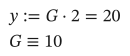
As text
y := G*2 = ?
G ::= 10
Globals are worked out among themselves top to bottom first. A global is defined once: defining its name again, with := or another ≡, is an error, so a global means the same thing everywhere in the sheet.
Use globals sparingly: for constants and settings that the whole sheet shares, such as material properties at the bottom of a page.
What a function sees
Section titled “What a function sees”A function’s body is worked out when it is called, but its other names are looked up where the function was defined:
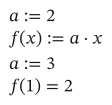
As text
a := 2
f(x) := a*x
a := 3
f(1) = ?
f was defined while a was 2, so changing a below doesn’t change f. Define the function again below to use the new value, or pass a as an argument.
A program’s local variables (←) belong to the program alone: assigning to a sheet’s name inside a program makes a local copy, and never changes the sheet’s value.
Errors carry forward
Section titled “Errors carry forward”A definition that fails leaves its name broken, and each statement that uses it says so: c has an error: a has an error: b is not defined. The first error in the chain is the one to fix.