
Type math in LaTeX
If you’re used to LaTeX, you can type math that way and Beermat turns it into its own math, drawn and worked out as usual.
A new statement
Section titled “A new statement”Press Ctrl+L (⌘L on a Mac), or the TeX button on the toolbar, at an empty spot. A LaTeX box opens at the crosshair. Type, for example:
M = \frac{q L^2}{8}and press Enter: the box becomes the definition below, and the crosshair moves under it, ready for the next one. Esc closes the box without making anything.
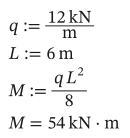
As text
q := 12 kN/m
L := 6 m
M := q L^2/8
M = ?
If the LaTeX can’t be read, the box stays open and says why underneath, so you can fix it.
Change a statement as LaTeX
Section titled “Change a statement as LaTeX”While you edit a statement, or with a math region selected, Ctrl+L shows it as LaTeX in the box. Change it and press Enter (or Ctrl+L again) to turn it back into math; Esc leaves it as it was. If you change nothing, nothing changes. A unit you asked for on a result (= ? kN·m) is kept, even though the LaTeX doesn’t show it.
Programs can’t be shown or typed as LaTeX yet.
Paste LaTeX
Section titled “Paste LaTeX”Paste LaTeX wrapped in $…$, $$…$$, \(…\) or \[…\] with Ctrl+V at the crosshair, and it becomes math, as if typed in the box. Copy as LaTeX gives LaTeX that pastes back the same way (Export).
What it reads
Section titled “What it reads”| LaTeX | Beermat |
|---|---|
\frac{a}{b}, a/b, a \div b | A fraction, a division on the line |
x^2, x^{n+1}, e^{-x} | Powers |
M_{max}, x_1, \sigma_y | Names with a subscript |
v_{i+1}, M_{i,j}, v_{[i]} | Indices: an expression, or one name in brackets |
\sqrt{x}, \sqrt[3]{x} | Roots |
\alpha, \Delta, \pi, \infty | Greek letters and ∞ |
\sin x, \ln(x), \max(a, b) | Functions, with or without parentheses |
a \cdot b, a \times b, 2x, q\,L | Multiplication |
\left( … \right), `\left | x \right |
\begin{bmatrix} 1 & 2 \\ 3 & 4 \end{bmatrix} | A matrix (pmatrix too) |
\sum_{i=1}^{n} i^2, \prod_{k=1}^{n} k | Sums and products |
\int_0^L x^2 \, dx | An integral |
\frac{d}{dx} x^3, \frac{d^2}{dx^2} f(x) | Derivatives |
12\,\mathrm{kN}, 12 kN, 20^{\circ}C | Units |
\le, \ge, \ne, <, > | Comparisons |
x^2 + 1 \to | A symbolic result |
\mathit{width}, \mathrm{P}, \mathbf{F} | One long name, an upright name, a bold name |
1.5 \times 10^{-3} | A number, 1.5e-3 |
How it reads, as LaTeX draws
Section titled “How it reads, as LaTeX draws”- Letters side by side are multiplied, as LaTeX shows them:
qLis q·L. Letters that name a unit or a built-in function stay together:kN,mm,max. For a variable with a longer name, write\mathit{width}. =with a name on its left defines it:x = 5is the definition x := 5, and so isf(x) = x^2.x =with nothing after it shows x’s value. With more on the left, as ina + b = 10, it is a constraint for a solve block.:=,\coloneqqand\equiv(a global definition) work too.- A subscript of letters or digits is part of the name (
M_{max},x_1), as it usually is in LaTeX. To index an array by a name, put it in brackets:v_{[i]}.