
A beam from start to finish
This page builds a short, complete calculation: a simply supported steel beam under a uniform load, checked for bending stress and deflection. It takes about fifteen minutes, and uses most of what you need every day.
The examples are drawn as Beermat shows them, worked out by Beermat itself. Under each, As text shows how it is written in the .bbm file, and Open this example opens the sheet so far in the browser.
1. A heading
Section titled “1. A heading”Click near the top of the page and type ": on an empty spot, a quote starts a text region. Text is Markdown, so a line starting with # is a heading:

As text
# Beam check
Press Escape to finish the text. (Typing a word and a space on an empty spot also starts a text region, with the word in it.)
2. The inputs
Section titled “2. The inputs”Click below the heading and type the span. : gives the definition sign :=:

As text
L := 6 m
Press Enter. The crosshair moves down a line, ready for the next one. Add the load, and the section’s properties:
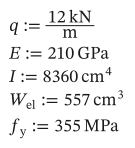
As text
q := 12 kN/m
E := 210 GPa
I := 8360 cm^4
W_el := 557 cm^3
f_y := 355 MPa
- Type math in the order you would write it on one line:
I:8360cm^4gives I := 8360 cm⁴. .after a name starts a subscript: typeW.el:557cm^3for Wel := 557 cm³.
3. Bending
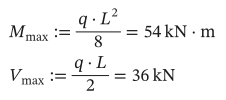
Section titled “3. Bending”Beside the inputs, or below them, work out the largest moment and shear. Type = at the end of a definition to show its value (M.max:q*L^2/8=):
As text
M_max := q*L^2/8 = ?
V_max := q*L/2 = ?
You typed no units for the result: Beermat worked them out from the inputs, and chose the prefix (kN·m rather than 54000 N·m).
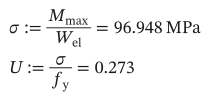
The stress, in the unit you want. Type the unit straight after the =, where it goes into the small placeholder at the end (s«Ctrl+G»:M.max/W.el=MPa):
As text
σ := M_max/W_el = ? MPa
U := σ/f_y = ?
Greek letters: type the Latin letter, then Ctrl+G (s then Ctrl+G is σ), or pick it from the Greek palette.
4. Deflection
Section titled “4. Deflection”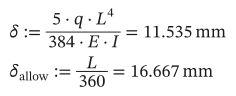
As text
δ := 5*q*L^4/(384*E*I) = ?
δ_allow := L/360 = ?
5. A check that reads like one
Section titled “5. A check that reads like one”
As text
check := if(δ <= δ_allow, "OK", "too flexible") = ?
<= gives ≤. if(condition, then, else) picks one of two values; a string in quotes is a value like any other.
6. Try another beam
Section titled “6. Try another beam”Click on 6 m and make it 7 m. Every result below changes at once. The page is worked out from top to bottom, then left to right, so a value can only use what is above it (or to its left).
7. The moment along the beam
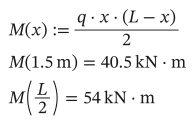
Section titled “7. The moment along the beam”A function of x:
As text
M(x) := q*x*(L - x)/2
M(1.5 m) = ?
M(L/2) = ?
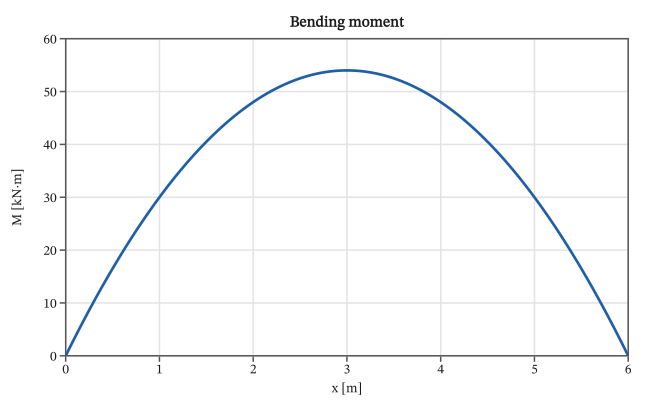
To draw it, press @ on an empty spot (or Insert → X-Y plot). A small example plot appears, open as its settings. Change them to:
title: Bending momentx: x = 0 m .. Lx_unit: mtraces: - y: M(x) unit: kN*m label: MPress Escape, and the plot is drawn:
As text
```plot
title: Bending moment
x: x = 0 m .. L
x_unit: m
traces:
  - y: M(x)
    unit: kN*m
    label: M
```Plots has more.
8. Save, print, share
Section titled “8. Save, print, share”- File → Save (
Ctrl+S) asks where the first time, then writes a.bbmfile: plain text that keeps your results with it. - File → Print… or File → Export to PDF… for paper or a PDF.
- Edit → Copy as LaTeX or Copy as MathML copies the statement you are editing, with its result, to paste into a document (Export).
Where next
Section titled “Where next”- Units: typing, converting, and the mistakes they catch.
- Arrays and ranges: the same check for several spans at once.
- The math syntax, when you want to write or read
.bbmfiles by hand.