
Arrays and ranges
A table of results
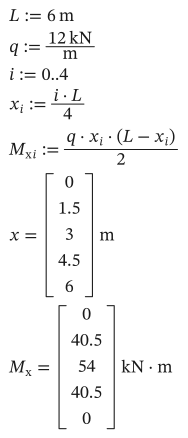
Section titled “A table of results”A range variable takes a run of whole numbers. A statement that uses it is worked out once for each value:
As text
L := 6 m
q := 12 kN/m
i := 0..4
x[i] := i*L/4
M_x[i] := q*x[i]*(L - x[i])/2
x = ?
M_x = ?
Type ; for the two dots of a range (i:0;4), and [ for an index (x[i). On the page, x[i] is drawn as x with a subscript i, and the results as columns.
x[i] := …defines one element of the vector x for each value of i.- A range can step by any amount: give the first two values, then the last.
s := 0 m, 1.5 m..Lis 0, 1.5, 3, 4.5 and 6 m. - A range variable stands for one value at a time, so
y := i^2is an error: define elements (y[i] := i^2) instead.
Vectors and matrices
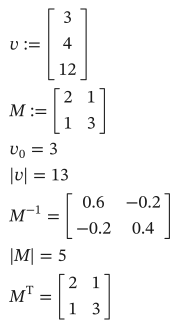
Section titled “Vectors and matrices”Ctrl+M asks for the number of rows and columns and makes an empty matrix to fill in. In a file, , separates columns and ; rows:
As text
v := [3; 4; 12]
M := [2, 1; 1, 3]
v[0] = ?
|v| = ?
M^-1 = ?
|M| = ?
M^T = ?
- Indices start at 0. To count from 1, define
ORIGIN := 1above, or setorigin: 1for the whole sheet. |v|is a vector’s length, and|M|a square matrix’s determinant.M^-1is the inverse andM^Tthe transpose (Ctrl+1).M^<j>is column j of M (Ctrl+6).
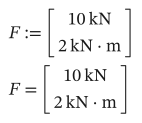
Each element keeps its own unit, so a vector can hold a force and a moment:
As text
F := [10 kN; 2 kN*m]
F = ?
Working on every element
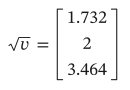
Section titled “Working on every element”A function that takes one number, such as sqrt, sin or round, works on every element of an array, and gives an array of the same shape:
As text
sqrt(v) = ?
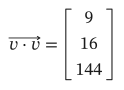
Arithmetic between arrays follows the rules of matrices: M*v is a matrix product, and two vectors multiplied give their dot product. To multiply element by element instead, wrap the expression in vec( ) (Ctrl+-, drawn as an arrow over it):
As text
vec(v*v) = ?
As text
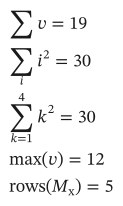
sum(v) = ?
sum(i^2, i) = ?
sum(k^2, k, 1, 4) = ?
max(v) = ?
rows(M_x) = ?
sum(v) adds a vector’s elements; sum(expr, i) adds over a range variable ($); sum(expr, k, a, b) from a to b (Ctrl+Shift+4). prod is the same for products.
The array functions include rows, cols, augment, stack, submatrix, sort, eigenvals and more.
Big arrays
Section titled “Big arrays”An array with more than 20 rows or columns is shown as a table of 20 at a time, with its row and column numbers. Scroll it with the mouse wheel over it (Shift and the wheel to go sideways).