
Use functions from a Python file
A sheet can call the functions of a Python file beside it. Python comes with the desktop app, so there is nothing else to install.
A Python file
Section titled “A Python file”beam_tools.py, in the same folder as the sheet:
def moment(q: "kN/m", L: "m") -> "kN*m":    """The largest bending moment of a simply supported beam."""    return q * L**2 / 8
def add(a, b):    return a + b
Using it
Section titled “Using it”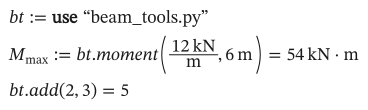
As text
bt := use "beam_tools.py"
M_max := bt.moment(12 kN/m, 6 m) = ?
bt.add(2, 3) = ?
use "file.py"gives the file’s functions as a module, held in a variable (bt). The path is relative to the sheet.bt.momentis the functionmoment. Typingbt.lists the functions, narrowed as you type; resting the mouse onbt.momentshows its signature and docstring.- The file is read again when it changes, so you can edit it beside the sheet.
Annotate the arguments and the result with their units, as strings. Beermat checks each argument’s unit, passes the plain number in that unit (12 and 6 above), and puts the unit on the result.
Without annotations, the arguments and the result are plain numbers. A value with a unit passed to such a function is an error:

As text
bt.add(2 m, 3) = ?
Arrays go in and out as lists (of lists), and strings as strings. An error in the Python code shows as the statement’s error, with the line in the .py file.
Allowing the file to run
Section titled “Allowing the file to run”A Python file can do anything a program can, so the first time a sheet uses one, Beermat shows its path and asks before running it. The answer is remembered for that file; if the file changes, it asks again. On the command line, add --allow-python.
Packages
Section titled “Packages”The bundled Python has its standard library and SymPy. For more, such as NumPy or SciPy, use Tools → Python packages…: type the package’s name and choose Install. No terminal or administrator rights are needed.
import numpy as np
def norm(x, y): return float(np.linalg.norm([x, y]))- Packages go in a folder of your own (shown in the dialog), which updates of Beermat leave alone.
- When an update brings a newer Python, the dialog offers Install again for the packages you had.
- From a terminal:
beermat packages install numpy(alsolist,removeandreinstall).
Your own Python
Section titled “Your own Python”If you already keep a Python of your own, a virtual environment or a Conda environment with your packages and modules in it, Beermat can run your sheets’ Python files there instead. In Tools → Python packages…, choose Your own Python and pick its interpreter (python.exe, python3) or the environment’s folder. It needs Python 3.9 or newer.
- Your packages are then the ones in that Python: install them with its own
piporconda. The package list in the dialog is for Beermat’s Python, so it is off meanwhile. - Symbolic algebra stays in Beermat’s own Python, so its results don’t depend on your Python.
- It is a setting of your computer, not of the sheet: on another computer the sheet runs in Beermat’s Python, so its packages need to be there.
- From a terminal:
beermat python ~/envs/calcuses an environment,beermat python bundledgoes back, andbeermat pythonsays which is in use.
Python functions are in the desktop app; the browser has no Python.