
The math syntax
On the page, math is drawn: fractions stacked, roots with their sign, subscripts lowered. Underneath, every statement is a line of plain text, the linear syntax. It is what a .bbm file holds, what the command line prints, what AI assistants read and write, and what Ctrl+C copies.
M_max := q*L^2/8 = ? kN*mis drawn as Mmax := q·L²/8 = 54 kN·m. You never need to type the text form in the app (the keys build the math), but it is good to read.
Statements
Section titled “Statements”| Write | Means | Key in the app |
|---|---|---|
x := 3 m | Define x | : |
g ::= 9.81 m/s^2 | A global definition (≡), defined before everything else | ~ |
x = ? | Show x’s value | = |
x = ? mm | Show it in mm | =, then the unit |
M := q*L^2/8 = ? kN*m | Define and show | = at the end of a definition |
diff(x^3, x) -> ? | Evaluate symbolically (→) | Ctrl+. |
x^2 - 4 -> solve(x) -> ? | Symbolic, with a keyword | Ctrl+Shift+. |
? is an empty slot. After = or -> it is where the result goes; anywhere else it is a placeholder still to fill, drawn as ■. In a file, a result is kept after the statement, as #= 54 kN*m (or #! message for an error); see the file format.
Numbers and text
Section titled “Numbers and text”| Write | Is |
|---|---|
3, 3.5, .5, 1.2e-3 | Numbers |
2i, 3 + 4i | Complex numbers (the imaginary unit is 1i; a plain i is a name) |
0x1F, 0o17, 0b101 | Hexadecimal, octal, binary (0x1F + 0b101 is 36) |
"hello" | Text (a string) |
[1, 2; 3, 4] | A matrix: , between columns, ; between rows |
[1; 2; 3] | A column vector |
- Letters, digits,
_and', starting with a letter:x,F2,f'. Case matters:Fandfare different. - Greek letters are themselves:
α,Δ. In plain ASCII,\alphaand\Deltaare read as α and Δ. - Subscripts: everything after the first
_is a subscript, drawn lowered:M_max. Typed with.in the app.x_1is a name, not an index. - Units are names too, so
m,kNandsare built-in names. Defining your ownmhides the metre below it. ∇,∂and°count as letters:∇H,Δ°C.- Any other character needs the name in backticks:
`θ*`,`x%`. In the app, Ctrl+Shift+K types such a name; the backticks are never drawn. x_(an empty subscript, typedx.) is a different name fromxthat looks the same.
Name styles
Section titled “Name styles”A name can be plain (drawn italic), bold or upright, and each style is a different variable: F, \bf F and \rm F can hold three values. Ctrl+B makes a name bold; Ctrl+I turns a plain name upright and back.
- Built-in units, functions and constants are plain, except the gram, which is the upright
\rm g(plaingis gravity). \itmarks a plain name, for a variable named like a keyword:\it if := 4.
Operators
Section titled “Operators”From loosest to tightest:
| Write | Is |
|---|---|
try a on error b | a, or b if a fails |
a or b, a xor b | Logical or, exclusive or |
a and b | Logical and |
not a | Logical not |
==, !=, <, <=, >, >= | Comparisons, giving 1 (true) or 0 (false). == is the bold equals (Ctrl+=). Chains: 0 < x < 1 |
a..b, a, b..c | A range (only as a definition’s whole value, or in a for) |
+, - | Add, subtract |
*, /, ÷, × | Multiply, divide, cross product |
-a | Negative |
a^b | Power (-x^2 is −(x²)) |
a!, M^T, M^<j> | Factorial, transpose, column j |
v[i], M[i, j], f(x) | Element, call |
- Multiplying by a name needs no
*:12 kN/mis 12·kN/m, andq L^2(with a space) is q·L², drawn with a thin space instead of a dot. - A division
/is drawn stacked.÷and∕divide on the line, drawn ÷ or /; right-click a division to change it. - A multiplication
*is drawn as the sheet says (a dot by default; Format → Multiplication);·is always a dot. Right-click one to change it. |x|is the absolute value, a vector’s length, or a matrix’s determinant.
Functions
Section titled “Functions”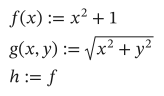
As text
f(x) := x^2 + 1
g(x, y) := sqrt(x^2 + y^2)
h := f
Some built-ins are drawn as math:
| Write | Drawn as |
|---|---|
sqrt(x), nthroot(x, n) | √x, ⁿ√x |
sum(e, i), sum(e, k, a, b) | Σ over a range variable, or from a to b |
prod(e, i), prod(e, k, a, b) | Π |
int(e, x, a, b) | ∫ from a to b … dx |
diff(e, x), diff(e, x, n) | d/dx, dⁿ/dxⁿ |
lim(e, x, a) | lim as x → a |
vec(e) | an arrow over e: element by element |
The functions reference has every one. Functions from a Python file are reached with a dot: bt := use "beam_tools.py", then bt.moment(q, L) (Python).
Ranges and indices
Section titled “Ranges and indices”i := 0..10 whole numbers 0 to 10x := 0, 0.1..1 0, 0.1, 0.2 … 1v[i] := i^2 one element per value of iM[1, 2] an elementM^<2> column 2Indices count from ORIGIN, 0 unless the sheet sets it (ORIGIN := 1, or origin: 1 in the settings).
Programs
Section titled “Programs”A definition ending in := takes the indented lines below it as a program, two spaces per level:
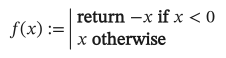
As text
f(x) :=
  if x < 0
    return -x
  otherwise
x| Write | Is |
|---|---|
a <- expr | A local variable (drawn ←) |
if cond + lines, otherwise + lines | Conditions |
x if cond, x otherwise | The same on one line |
for k in 1..n, for x in v | A loop over a range or a vector |
while cond | A loop while cond holds |
return x, break, continue | Leave the program, the loop, or this turn of it |
A program’s value is that of the last line it runs. No blank lines inside a program, and indent with spaces, not tabs. Where a program is only part of a value, the word program stands in its place, with its lines below:
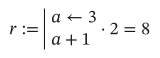
As text
r := program*2 = ?
  a <- 3
  a + 1
gives 8.
Solve blocks
Section titled “Solve blocks”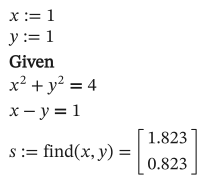
As text
x := 1
y := 1
given
x^2 + y^2 == 4
x - y == 1
s := find(x, y) = ?
See Solve equations.
Symbolic
Section titled “Symbolic”(x + 1)^2 -> expand -> ?x^2 - 4 -> solve(x) -> ?Keywords chain from left to right, each followed by ->; the statement ends with -> ?. See Symbolic algebra.
No comments
Section titled “No comments”Math has no comments: notes go in text regions beside it. In a file, #= and #! at the end of a line hold results and errors.