
A small program
When a formula isn’t enough, a definition can hold a program: a few lines worked out in order, drawn with a bar down their left side.
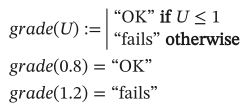
As text
grade(U) :=
  "OK" if U <= 1
  "fails" otherwise
grade(0.8) = ?
grade(1.2) = ?
Making one
Section titled “Making one”Type the definition’s name and :, then ]. The value becomes a program with two empty lines. In each line:
}makes anifline: the value first, then the condition afterif.- Type
otherwiseand a space on a new line for the line that runs when noifabove it did. ]adds another line below the one you are on.
The toolbar’s Programming palette has a button for each, with its key in the tooltip.
The program’s value is the value of the last line it runs.
Local variables and loops
Section titled “Local variables and loops”{ makes a local assignment, drawn ←. Local names exist only inside the program; changing one never changes the sheet’s variables.
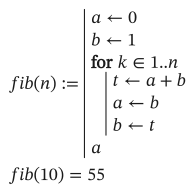
As text
fib(n) :=
  a <- 0
  b <- 1
  for k in 1..n
    t <- a + b
    a <- b
    b <- t
  a
fib(10) = ?Type for and a space for a for loop, while and a space for a while loop. A for loop runs over a range (1..n) or over the elements of a vector:
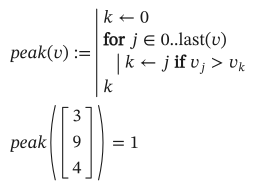
As text
peak(v) :=
  k <- 0
  for j in 0..last(v)
    k <- j if v[j] > v[k]
  k
peak([3; 9; 4]) = ?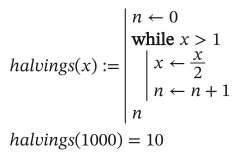
As text
halvings(x) :=
  n <- 0
  while x > 1
    x <- x/2
    n <- n + 1
  n
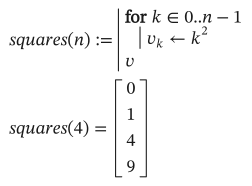
halvings(1000) = ?A loop can build an array:
As text
squares(n) :=
  for k in 0..n - 1
    v[k] <- k^2
  v
squares(4) = ?Leaving early
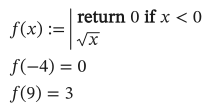
Section titled “Leaving early”return ends the program with a value. break leaves a loop, and continue goes on to its next turn.
As text
f(x) :=
  return 0 if x < 0
  sqrt(x)
f(-4) = ?
f(9) = ?
Catching errors
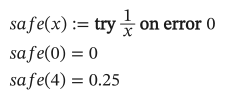
Section titled “Catching errors”try a on error b is a, or b when working out a fails. It works anywhere, not only in programs:
As text
safe(x) := try 1/x on error 0
safe(0) = ?
safe(4) = ?
Careful with a for loop over 1..n when n can be 0: a range counts down as well as up, so 1..0 runs twice, for 1 and then 0.