
Tables of inputs and results
A table shows inputs and results as a neat grid. Its computed cells are Beermat expressions, and its columns can be used below it.
Making a table
Section titled “Making a table”Click where the table should go, then Insert → Table (or the ▦ button in the Insert palette). A small table appears, named T1, with the cursor in its first cell: type over it, and add rows with Enter past the last one. To rename it, right-click it and choose Name….
In the file, a table is a Markdown table inside a table fence, so it can also be written in a text editor or by an AI assistant:
```calcL := 6 m```
```table {name=Loads}| Case    | q [kN/m] | M [kN*m]  ||---------|---------:|----------:|| Dead    | 4.5      | = q*L^2/8 || Imposed | 7.5      | = q*L^2/8 || Total   | = sum(q) | = sum(M)  |```
```calcM_Loads = ?M_d := 1.35*M_Loads[0] + 1.5*M_Loads[1] = ?```
On the page, the computed cells show their values, and below the table the column is a vector:
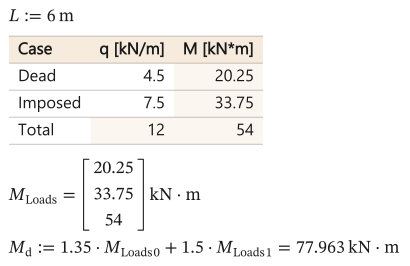
As text
```calc
L := 6 m
```

```table {name=Loads}
| Case    | q [kN/m] | M [kN*m]  |
|---------|---------:|----------:|
| Dead    | 4.5      | = q*L^2/8 |
| Imposed | 7.5      | = q*L^2/8 |
| Total   | = sum(q) | = sum(M)  |
```

```calc
M_Loads = ?
M_d := 1.35*M_Loads[0] + 1.5*M_Loads[1] = ?
```The line of dashes says how each column is aligned: ---: to the right, :---: centred.
The header row
Section titled “The header row”Each column has a name and, in brackets, a unit: q [kN/m]. Numbers in the column are in that unit. A column of words (Case) needs no unit.
A cell holds a number, a word, or an expression starting with =:
- In a row, a column’s name is that row’s value:
= q*L^2/8uses the row’s q, andLfrom the sheet above. - In its own column, a column’s name is the whole column, so a totals row can add it up:
= sum(q). - A cell can also be named as in a spreadsheet, column letter and row number:
= B2*B3,= sum(B2:B4). Row 1 is the header, so the first row of values is row 2.
Using the table below it
Section titled “Using the table below it”With a name ({name=Loads} after table), each named column is a vector for the statements below the table, with the table’s name as subscript: q_Loads, M_Loads. Every row is in it, a totals row too. The whole grid is Loads, and cells(Loads, "C2:C3") takes a range of it. A table without a name is for show: its cells can still use the sheet’s variables (= M_max).
Editing in the app
Section titled “Editing in the app”Click a cell to put the cell cursor on it, and type to replace what it holds; F2 or a double-click edits it instead. The arrows, Tab and Enter move between cells, and Enter or Tab past the last row adds a row. Right-click to insert or delete rows and columns, to name the table, or to edit it as Markdown. Ctrl+V pastes cells copied from a spreadsheet.